本文讲述使用JSP实现用户登录,包括用户登录、注册和退出功能等。
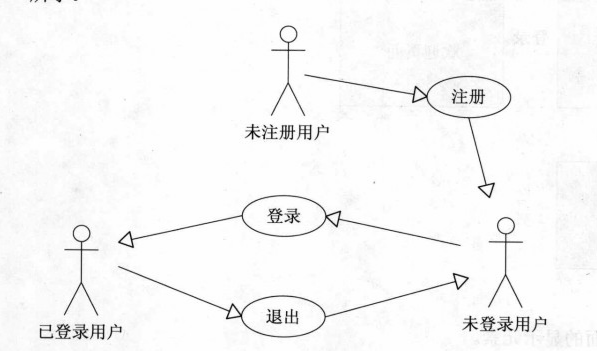
1.系统用例图
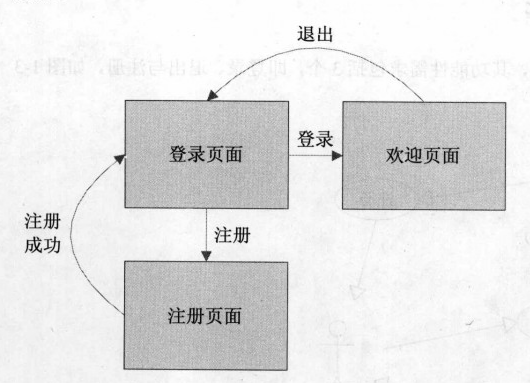
2.页面流程图
3.数据库设计
本例使用oracle数据库
创建用户表
包括id,username,password和email,共4个字段
-- Create table
create table P_USER
(
 id VARCHAR2(50) not null,
 username VARCHAR2(20),
 password VARCHAR2(20),
 email VARCHAR2(50)
)
tablespace USERS
 pctfree 10
 initrans 1
 maxtrans 255
 storage
 (
 initial 64
 minextents 1
 maxextents unlimited
 );
-- Add comments to the table
comment on table P_USER
 is '用户表';
-- Add comments to the columns
comment on column P_USER.id
 is 'id';
comment on column P_USER.username
 is '用户名';
comment on column P_USER.password
 is '密码';
comment on column P_USER.email
 is 'email';
4.页面设计
4.1登录页面
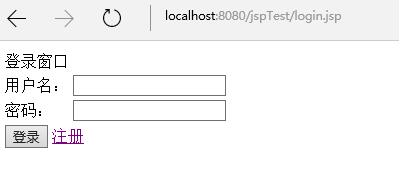
login.jsp
%@ page language="java" import="java.util.*" pageEncoding="UTF-8"%>
%
String path = request.getContextPath();
String basePath = request.getScheme()+"://"+request.getServerName()+":"+request.getServerPort()+path+"/";
%>

!DOCTYPE HTML PUBLIC "-//W3C//DTD HTML 4.01 Transitional//EN">
html>
 head>
 base href="%=basePath%>">

 title>登录页面/title>

 meta http-equiv="pragma" content="no-cache">
 meta http-equiv="cache-control" content="no-cache">
 meta http-equiv="expires" content="0">
 meta http-equiv="keywords" content="keyword1,keyword2,keyword3">
 meta http-equiv="description" content="This is my page">
 !--
 link rel="stylesheet" type="text/css" href="styles.css">
 -->
 /head>

 body>
 form action="login_action.jsp" method="post">
 table>
 tr>
 td colspan="2">登录窗口/td>
 /tr>
 tr>
 td>用户名:/td>
 td>input type="text" name="username" />
 /td>
 /tr>
 tr>
 td>密码:/td>
 td>input type="text" name="password" />
 /td>
 /tr>
 tr>
 td colspan="2">input type="submit" value="登录" /> a href="register.jsp">注册/a>
 /td>
 /tr>
 /table>
 /form>
/body>
/html>
页面效果
4.2登录逻辑处理页面
login_action.jsp
%@ page language="java" import="java.util.*" pageEncoding="utf-8"%>
%@ page import="java.sql.*" %>
%
String path = request.getContextPath();
String basePath = request.getScheme()+"://"+request.getServerName()+":"+request.getServerPort()+path+"/";
%>

 %
 String username = request.getParameter("username");
 String password = request.getParameter("password");
 if(username==null||"".equals(username.trim())||password==null||"".equals(password.trim())){
 //out.write("用户名或密码不能为空!");
 System.out.println("用户名或密码不能为空!");
 response.sendRedirect("login.jsp");
 return;
 //request.getRequestDispatcher("login.jsp").forward(request, response);
 }
 boolean isValid = false;
 Connection con = null;// 创建一个数据库连接
 PreparedStatement pre = null;// 创建预编译语句对象,一般都是用这个而不用Statement
 ResultSet result = null;// 创建一个结果集对象
 try
 {
 Class.forName("oracle.jdbc.driver.OracleDriver");// 加载Oracle驱动程序
 //System.out.println("开始尝试连接数据库!");
 String url = "jdbc:oracle:" + "thin:@127.0.0.1:1521:orcl";// 127.0.0.1是本机地址,orcl是Oracle的默认数据库名
 String user = "scott";// 用户名,系统默认的账户名
 String pwd = "tiger";// 你安装时选设置的密码
 con = DriverManager.getConnection(url, user, pwd);// 获取连接
 // System.out.println("连接成功!");
 String sql = "select * from p_user where username=? and password=?";// 预编译语句,“?”代表参数
 pre = con.prepareStatement(sql);// 实例化预编译语句
 pre.setString(1, username);// 设置参数,前面的1表示参数的索引,而不是表中列名的索引
 pre.setString(2, password);// 设置参数,前面的1表示参数的索引,而不是表中列名的索引
 result = pre.executeQuery();// 执行查询,注意括号中不需要再加参数
 if (result.next()){
 isValid = true;
 }
 }
 catch (Exception e)
 {
 e.printStackTrace();
 }
 finally
 {
 try
 {
 // 逐一将上面的几个对象关闭,因为不关闭的话会影响性能、并且占用资源
 // 注意关闭的顺序,最后使用的最先关闭
 if (result != null)
 result.close();
 if (pre != null)
 pre.close();
 if (con != null)
 con.close();
 //System.out.println("数据库连接已关闭!");
 }
 catch (Exception e)
 {
 e.printStackTrace();
 }
 }
 if(isValid){
 System.out.println("登录成功!");
 session.setAttribute("username", username);
 response.sendRedirect("welcome.jsp");
 return;
 }else{
 System.out.println("登录失败!");
 response.sendRedirect("login.jsp");
 return;
 }
 %>
使用JDBC连接数据库,如果用户名或密码为空时,还是跳转到登录页面login.jsp
如果用户名和密码不为空,进行连接数据库查询用户表,如果能够查询到记录,表示登录成功,将用户信息保存到session,跳转到欢迎页面welcome.jsp
如果根据用户名和密码查询不到记录,表示登录失败,重新跳转到登录页面login.jsp
4.3欢迎页面
welcome.jsp
%@ page language="java" import="java.util.*" pageEncoding="UTF-8"%>
%
String path = request.getContextPath();
String basePath = request.getScheme()+"://"+request.getServerName()+":"+request.getServerPort()+path+"/";
%>

!DOCTYPE HTML PUBLIC "-//W3C//DTD HTML 4.01 Transitional//EN">
html>
 head>
 base href="%=basePath%>">

 title>My JSP 'welcom.jsp' starting page/title>

 meta http-equiv="pragma" content="no-cache">
 meta http-equiv="cache-control" content="no-cache">
 meta http-equiv="expires" content="0">
 meta http-equiv="keywords" content="keyword1,keyword2,keyword3">
 meta http-equiv="description" content="This is my page">
 !--
 link rel="stylesheet" type="text/css" href="styles.css">
 -->
 /head>

 body>
 table>
 tr>
 td>img src="images/logo4.png" />
 /td>
 td>img src="images/logo2.png" height="90" />
 /td>
 /tr>
 tr>
 td colspan="2">hr />
 /td>
 /tr>
 tr>
 td>
 table>
 tr>
 td>a>Main/a>
 /td>
 /tr>
 tr>
 td>a>Menu1/a>
 /td>
 /tr>
 tr>
 td>a>Menu2/a>
 /td>
 /tr>
 tr>
 td>a>Menu3/a>
 /td>
 /tr>
 tr>
 td>a>Menu4/a>
 /td>
 /tr>
 tr>
 td>a>Menu5/a>
 /td>
 /tr>
 tr>
 td>a>Menu6/a>
 /td>
 /tr>
 tr>
 td>a>Menu7/a>
 /td>
 /tr>
 tr>
 td>a>Menu8/a>
 /td>
 /tr>
 /table>/td>
 td>
 form action="loginout.jsp" method="post">
 table>
 tr>
 td colspan="2">登录成功!/td>
 /tr>
 tr>
 td>欢迎你,/td>
 td>${username }/td>
 /tr>
 tr>
 td colspan="2">input type="submit" value="退出" />/td>
 /tr>
 /table>
 /form>/td>
 /tr>
 /table>
/body>
/html>
使用EL表达式展示用户信息
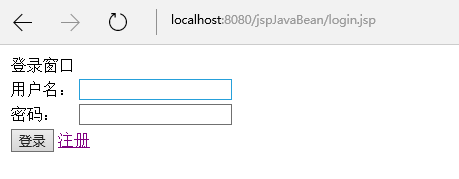
效果
4.4欢迎页退出逻辑处理页面
loginout.jsp
%@ page language="java" import="java.util.*" pageEncoding="UTF-8"%>
%
String path = request.getContextPath();
String basePath = request.getScheme()+"://"+request.getServerName()+":"+request.getServerPort()+path+"/";
%>

!DOCTYPE HTML PUBLIC "-//W3C//DTD HTML 4.01 Transitional//EN">
html>
 head>
 base href="%=basePath%>">

 title>My JSP 'loginout.jsp' starting page/title>

 meta http-equiv="pragma" content="no-cache">
 meta http-equiv="cache-control" content="no-cache">
 meta http-equiv="expires" content="0">
 meta http-equiv="keywords" content="keyword1,keyword2,keyword3">
 meta http-equiv="description" content="This is my page">
 !--
 link rel="stylesheet" type="text/css" href="styles.css">
 -->

 /head>

 body>
 %
 session.removeAttribute("username");
 response.sendRedirect("login.jsp");
 %>
 /body>
/html>
将session的用户信息移除,跳转到登录页面login.jsp
4.5注册页面
register.jsp
%@ page language="java" import="java.util.*" pageEncoding="UTF-8"%>
%
String path = request.getContextPath();
String basePath = request.getScheme()+"://"+request.getServerName()+":"+request.getServerPort()+path+"/";
%>

!DOCTYPE HTML PUBLIC "-//W3C//DTD HTML 4.01 Transitional//EN">
html>
 head>
 base href="%=basePath%>">

 title>注册页面/title>

 meta http-equiv="pragma" content="no-cache">
 meta http-equiv="cache-control" content="no-cache">
 meta http-equiv="expires" content="0">
 meta http-equiv="keywords" content="keyword1,keyword2,keyword3">
 meta http-equiv="description" content="This is my page">
 !--
 link rel="stylesheet" type="text/css" href="styles.css">
 -->
 /head>

 body>
 form action="register_action.jsp" method="post">
 table>
 tr>
 td colspan="2">注册窗口/td>
 /tr>
 tr>
 td>用户名:/td>
 td>input type="text" name="username" />/td>
 /tr>
 tr>
 td>密码:/td>
 td>input type="text" name="password1" />/td>
 /tr>
 tr>
 td>确认密码:/td>
 td>input type="text" name="password2" />/td>
 /tr>
 tr>
 td>email:/td>
 td>input type="text" name="email" />/td>
 /tr>
 tr>
 td colspan="2">input type="submit" value="注册" /> a href="login.jsp">返回/a>/td>
 /tr>
 /table>
 /form>
/body>
/html>
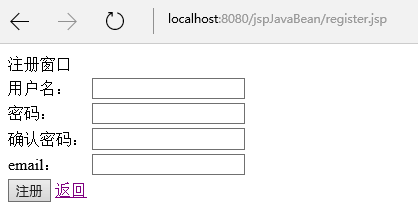
当在登录页面点击“注册“时打开用户注册页面
效果
4.6注册逻辑处理页面
register_action.jsp
%@ page language="java" import="java.util.*" pageEncoding="UTF-8"%>
%@ page import="java.sql.*" %>
%
String path = request.getContextPath();
String basePath = request.getScheme()+"://"+request.getServerName()+":"+request.getServerPort()+path+"/";
%>
 %
 String username = request.getParameter("username");
 String password1 = request.getParameter("password1");
 String password2 = request.getParameter("password2");
 String email = request.getParameter("email");
 if(username==null||"".equals(username.trim())||password1==null||"".equals(password1.trim())||password2==null||"".equals(password2.trim())||!password1.equals(password2)){
 //out.write("用户名或密码不能为空!");
 System.out.println("用户名或密码不能为空!");
 response.sendRedirect("register.jsp");
 return;
 //request.getRequestDispatcher("login.jsp").forward(request, response);
 }
 boolean isValid = false;
 Connection con = null;// 创建一个数据库连接
 PreparedStatement pre = null;// 创建预编译语句对象,一般都是用这个而不用Statement
 ResultSet result = null;// 创建一个结果集对象
 try
 {
 Class.forName("oracle.jdbc.driver.OracleDriver");// 加载Oracle驱动程序
 //System.out.println("开始尝试连接数据库!");
 String url = "jdbc:oracle:" + "thin:@127.0.0.1:1521:orcl";// 127.0.0.1是本机地址,orcl是Oracle的默认数据库名
 String user = "scott";// 用户名,系统默认的账户名
 String pwd = "tiger";// 你安装时选设置的密码
 con = DriverManager.getConnection(url, user, pwd);// 获取连接
 //System.out.println("连接成功!");
 String sql = "select * from p_user where username=?";// 预编译语句,“?”代表参数
 pre = con.prepareStatement(sql);// 实例化预编译语句
 pre.setString(1, username);// 设置参数,前面的1表示参数的索引,而不是表中列名的索引
 result = pre.executeQuery();// 执行查询,注意括号中不需要再加参数
 if (!result.next()){
 sql = "insert into p_user(id,username,password,email) values(?,?,?,?)";// 预编译语句,“?”代表参数
 pre = con.prepareStatement(sql);// 实例化预编译语句
 pre.setString(1, System.currentTimeMillis()+"");// 设置参数,前面的1表示参数的索引,而不是表中列名的索引
 pre.setString(2, username);// 设置参数,前面的1表示参数的索引,而不是表中列名的索引
 pre.setString(3, password1);// 设置参数,前面的1表示参数的索引,而不是表中列名的索引
 pre.setString(4, email);// 设置参数,前面的1表示参数的索引,而不是表中列名的索引
 pre.executeUpdate();// 执行
 isValid = true;
 }
 }
 catch (Exception e)
 {
 e.printStackTrace();
 }
 finally
 {
 try
 {
 // 逐一将上面的几个对象关闭,因为不关闭的话会影响性能、并且占用资源
 // 注意关闭的顺序,最后使用的最先关闭
 if (result != null)
 result.close();
 if (pre != null)
 pre.close();
 if (con != null)
 con.close();
 //System.out.println("数据库连接已关闭!");
 }
 catch (Exception e)
 {
 e.printStackTrace();
 }
 }
 if(isValid){
 System.out.println("注册成功,请登录!");
 response.sendRedirect("login.jsp");
 return;
 }else{
 System.out.println("用户名已存在!");
 response.sendRedirect("register.jsp");
 return;
 }
 %>
首先判断用户名和密码是否为空,以及密码和确认密码是否一致,如果上述条件不成立时,返回到注册页面register.jsp
如果上述条件成立,就根据用户名到数据库查询,如果能够查询到记录,说明用户名已经存在,返回到注册页面register.jsp
如果查询不到记录,说明此用户名可用来进行注册,使用JDBC向用户表 插入1条记录;之后跳转到登录页面login.jsp
5.总结
本例使用JSP实现用户登录,编写过程中,主要遇到了2个小问题。
5.1查询之后,判断记录是否存在,需要使用 if (!result.next()),而不是通常查询中使用的while循环,这一点需要注意,特别是在处理注册时。
5.2关于JSP页面的编译报错问题。
当在JSP小脚本中中使用return时要慎重,很可能会出现编译错误。
处理方法是,JSP主页面只使用JSP小脚本,保证return之后没有还需要编译的内容即可。
以上即为使用JSP实现用户登录的简单介绍,希望对大家的学习有所帮助。
您可能感兴趣的文章:- jsp+dao+bean+servlet(MVC模式)实现简单用户登录和注册页面
- 使用JSP实现简单的用户登录注册页面示例代码解析
- jsp实现用户自动登录功能
- jsp实现简单用户7天内免登录
- servlet+jsp实现过滤器 防止用户未登录访问
- JSP Spring防止用户重复登录的实现方法
- JavaWeb实现用户登录注册功能实例代码(基于Servlet+JSP+JavaBean模式)
- jsp基于XML实现用户登录与注册的实例解析(附源码)
- JSP实现简单的用户登录并显示出用户信息的方法
- 在jsp中用bean和servlet联合实现用户注册、登录
- 关于JSP用户登录连接数据库详情



 咨 询 客 服