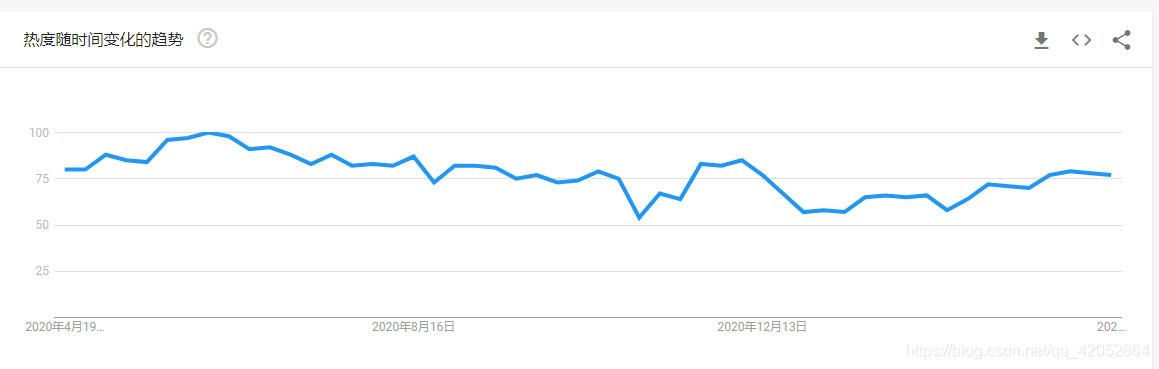
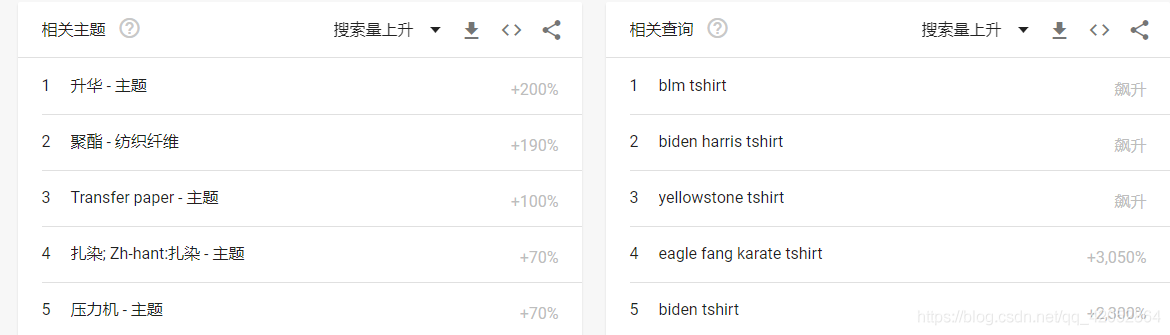
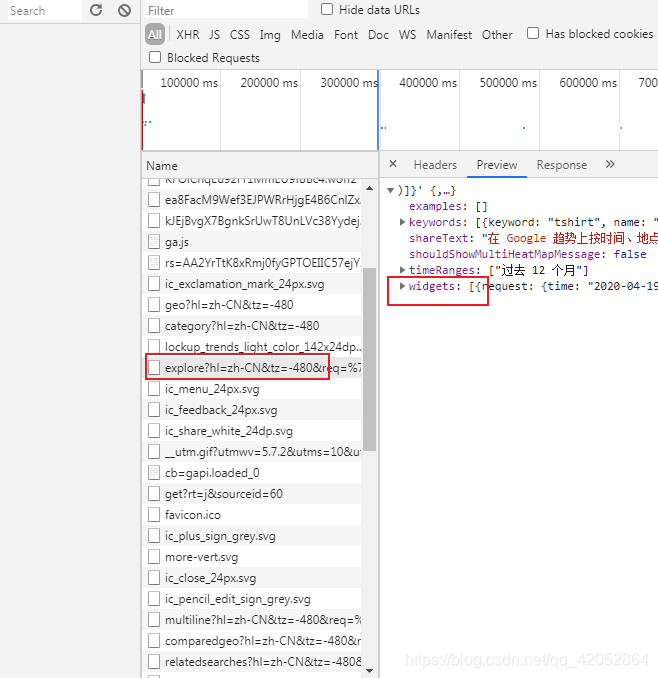
import socket
import socks
import requests
import json
import pandas as pd
import logging

#加入socks5代理后,可以获得当前程序的全局代理
socks.set_default_proxy(socks.SOCKS5,"127.0.0.1",1080)
socket.socket = socks.socksocket

#加入以下代码,否则会出现InsecureRequestWarning警告,虽然不影响使用,但看着糟心
# 捕捉警告
logging.captureWarnings(True)
# 或者加入以下代码,忽略requests证书警告
# from requests.packages.urllib3.exceptions import InsecureRequestWarning
# requests.packages.urllib3.disable_warnings(InsecureRequestWarning)

# 将三个页面获得的数据存为DataFrame
time_trends = pd.DataFrame()
related_topic = pd.DataFrame()
related_search = pd.DataFrame()

#填入自己打开网页的请求头
headers = {
    'user-agent': 'Mozilla/5.0 (Windows NT 6.1; Win64; x64) AppleWebKit/537.36 (KHTML, like Gecko) Chrome/89.0.4389.114 Safari/537.36',
    'x-client-data': 'CJa2yQEIorbJAQjEtskBCKmdygEI+MfKAQjM3soBCLKaywEI45zLAQioncsBGOGaywE=Decoded:message ClientVariations {// Active client experiment variation IDs.repeated int32 variation_id = [3300118, 3300130, 3300164, 3313321, 3318776, 3321676, 3329330, 3329635, 3329704];// Active client experiment variation IDs that trigger server-side behavior.repeated int32 trigger_variation_id = [3329377];}',
    'referer': 'https://trends.google.com/trends/explore',
    'cookie': '__utmc=10102256; __utmz=10102256.1617948191.1.1.utmcsr=(direct)|utmccn=(direct)|utmcmd=(none); __utma=10102256.889828344.1617948191.1617948191.1617956555.3; __utmt=1; __utmb=10102256.5.9.1617956603932; SID=8AfEx31goq255ga6Ldt9ljEVZ5xQ7fYTAdzCK3DgEYp2s6MOxeKc__hQ90tTtn0W-6AVoQ.; __Secure-3PSID=8AfEx31goq255ga6Ldt9ljEVZ5xQ7fYTAdzCK3DgEYp2s6MOLU4HYHzyoAXIvtAhfF_WNg.; HSID=AELT1m_DoHJY-r6SW; SSID=AJSlRt0T7ngXXMtqv; APISID=3Nt6oALGV8kSym2M/A2QeNBMtb9P7VcIwV; SAPISID=iAA0fu76JZezPfK4/Apws7zK1y-o74b2YD; __Secure-3PAPISID=iAA0fu76JZezPfK4/Apws7zK1y-o74b2YD; 1P_JAR=2021-04-06-06; SEARCH_SAMESITE=CgQIo5IB; NID=213=oYQE35gIVD2DrxbpY7NdAQsAEyg-If7Jh_nBdSKTkvmtgaVV7tYeSQNq_636cysbsajJP3_dKfr95w51ywK-dxVYhzPP4Zll9JndBYY98vd_XegGoeLEevpxIhNxUAv6H24OVt_edoGFkSjTpWKn4QAoIoerHCViyvozrvGF7m4scupppmxN-h9dwm1nrs15I3b_E-ifLq0lgd9s7QrgA-FRuaDeyuXN8t1K7l_DMTB1jkE5ED_dC-_QAO7DDw; SIDCC=AJi4QfFdMiK_qV41ViVJf0wWmtOu8yUVSQc_UEvemoaQwTGI9W0w2XwwkMCufVcYIS5ogRSkq5w; __Secure-3PSIDCC=AJi4QfEmB-gnzZLHWR4p1EmOfS2dhSz9zWSGNGOozrY2udFk4KwVmVo_srZdZrmdy7h_mwLSwQ'
}


# 获取需要的三个界面的req值和token值
def get_token_req(keyword):
    url = 'https://trends.google.com/trends/api/explore?hl=zh-CNtz=-480req={{"comparisonItem":[{{"keyword":"{}","geo":"US","time":"today 12-m"}}],"category":0,"property":""}}tz=-480'.format(
        keyword)
    html = requests.get(url, headers=headers, verify=False).text
    data = json.loads(html[5:])

    req_1 = data['widgets'][0]['request']
    token_1 = data['widgets'][0]['token']

    req_2 = data['widgets'][2]['request']
    token_2 = data['widgets'][2]['token']

    req_3 = data['widgets'][3]['request']
    token_3 = data['widgets'][3]['token']

    result = {'req_1': req_1, 'token_1': token_1, 'req_2': req_2, 'token_2': token_2, 'req_3': req_3,
              'token_3': token_3}
    return result


# 请求三个界面的数据,返回的是json数据,所以数据不用解析,完美
def get_info(keyword):
    content = []
    keyword = keyword
    result = get_token_req(keyword)

    #第一个界面
    req_1 = result['req_1']
    token_1 = result['token_1']
    url_1 = "https://trends.google.com/trends/api/widgetdata/multiline?hl=zh-CNtz=-480req={}token={}tz=-480".format(
        req_1, token_1)
    r_1 = requests.get(url_1, headers=headers, verify=False)
    if r_1.status_code == 200:
        try:
            content_1 = r_1.content
            content_1 = json.loads(content_1.decode('unicode_escape')[6:])['default']['timelineData']
            result_1 = pd.json_normalize(content_1)
            result_1['value'] = result_1['value'].map(lambda x: x[0])
            result_1['keyword'] = keyword
        except Exception as e:
            print(e)
            result_1 = None
    else:
        print(r_1.status_code)

    #第二个界面
    req_2 = result['req_2']
    token_2 = result['token_2']
    url_2 = 'https://trends.google.com/trends/api/widgetdata/relatedsearches?hl=zh-CNtz=-480req={}token={}'.format(
        req_2, token_2)
    r_2 = requests.get(url_2, headers=headers, verify=False)
    if r_2.status_code == 200:
        try:
            content_2 = r_2.content
            content_2 = json.loads(content_2.decode('unicode_escape')[6:])['default']['rankedList'][1]['rankedKeyword']
            result_2 = pd.json_normalize(content_2)
            result_2['link'] = "https://trends.google.com" + result_2['link']
            result_2['keyword'] = keyword
        except Exception as e:
            print(e)
            result_2 = None
    else:
        print(r_2.status_code)

    #第三个界面
    req_3 = result['req_3']
    token_3 = result['token_3']
    url_3 = 'https://trends.google.com/trends/api/widgetdata/relatedsearches?hl=zh-CNtz=-480req={}token={}'.format(
        req_3, token_3)
    r_3 = requests.get(url_3, headers=headers, verify=False)
    if r_3.status_code == 200:
        try:
            content_3 = r_3.content
            content_3 = json.loads(content_3.decode('unicode_escape')[6:])['default']['rankedList'][1]['rankedKeyword']
            result_3 = pd.json_normalize(content_3)
            result_3['link'] = "https://trends.google.com" + result_3['link']
            result_3['keyword'] = keyword
        except Exception as e:
            print(e)
            result_3 = None
    else:
        print(r_3.status_code)

    content = [result_1, result_2, result_3]

    return content

def main():
    global time_trends,related_search,related_topic
    with open(r'C:\Users\Desktop\words.txt','r',encoding = 'utf-8') as f:
        words = f.readlines()
    for keyword in words:
        keyword = keyword.strip()
        data_all = get_info(keyword)
        time_trends = pd.concat([time_trends,data_all[0]],sort = False)
        related_topic = pd.concat([related_topic,data_all[1]],sort = False)
        related_search = pd.concat([related_search,data_all[2]],sort = False)

if __name__ == "__main__":
    main()
到此这篇关于python爬虫之爬取谷歌趋势数据的文章就介绍到这了,更多相关python爬取谷歌趋势内容请搜索脚本之家以前的文章或继续浏览下面的相关文章希望大家以后多多支持脚本之家!



 咨 询 客 服