经常在各大论坛或新闻板块详情页面下边看到评论功能,当然不单单是直接发表评论内容那么简单,可以对别人的评论进行回复,别人又可以对你的回复再次评论或回复,如此反复,理论上可以说是没有休止,从技术角度分析很容易想到运用无限级分类技术存储数据,运用递归获取评论层级结构数据,运用ajax实现评论页面交互,这里用thinkphp框架做个简单的demo练练手,为了简化流程这里第三级评论开始停止回复,当然只要在这个基础上稍作修改就可以实现无限回复功能,主要是view层样式修改较麻烦,需花些时间。
一、效果需求分析:
1.在头部可以直接发布一级评论,最新发表的评论显示在最上面,如下效果图
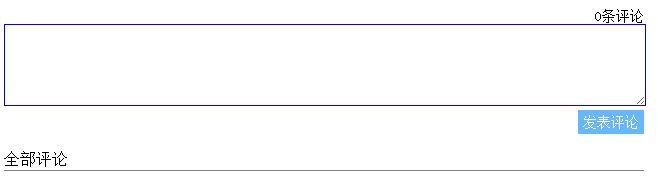
2.对发表的评论可以回复,回复显示在上级评论下边,形成层级关系,如下效果图

3.页面操作细节:点击某个评论的回复按钮时,显示回复文本输入框,同时其他评论的回复文本输入框消失,当再次点击该回复按钮时,该文本框消失
4.在最后一级评论(这里设置是第三级)关闭回复功能
5.即时显示评论总数
二、实现思路及细节
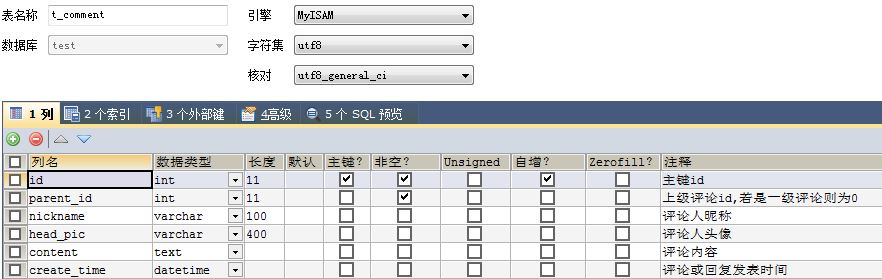
1.数据表设计
2.controller层关键函数:
(1). 递归获取评论列表
/**
*递归获取评论列表
 */
 protected function getCommlist($parent_id = 0,$result = array()){
 $arr = M('comment')->where("parent_id = '".$parent_id."'")->order("create_time desc")->select();
 if(empty($arr)){
 return array();
 }
 foreach ($arr as $cm) {
 $thisArr=$result[];
 $cm["children"] = $this->getCommlist($cm["id"],$thisArr);
 $thisArr = $cm;
 }
 return $result;
 }
(2). 展示评论页面的action
public function index(){
 $num = M('comment')->count(); //获取评论总数
 $this->assign('num',$num);
 $data=array();
 $data=$this->getCommlist();//获取评论列表
 $this->assign("commlist",$data);
 $this->display('index');
 }
(3).评论页面ajax访问添加评论的action
/**
*添加评论
 */
 public function addComment(){
 $data=array();
 if((isset($_POST["comment"]))(!empty($_POST["comment"]))){
 $cm = json_decode($_POST["comment"],true);//通过第二个参数true,将json字符串转化为键值对数组
 $cm['create_time']=date('Y-m-d H:i:s',time());
 $newcm = M('comment');
 $id = $newcm->add($cm);

 $cm["id"] = $id;
 $data = $cm;

 $num = M('comment')->count();//统计评论总数
 $data['num']= $num;

 }else{
 $data["error"] = "0";
 }


 echo json_encode($data);
 }
3.view层实现
(1). 展示页面的整体结构设计

实际效果:

页面html代码:
!DOCTYPE HTML PUBLIC "-//W3C//DTD HTML 4.01 Transitional//EN" "http://www.w3.org/TR/html4/loose.dtd">
html lang="en">
head>
 meta http-equiv="Content-Type" content="text/html;charset=UTF-8">
 title>php无限级分类实战————评论及回复功能/title>
 link rel="stylesheet" type="text/css" href="/Public/css/comment.css" rel="external nofollow" >
 script type="text/javascript" src="/Public/js/jquery-1.11.3.min.js" >/script>
 script type="text/javascript" src="/Public/js/comment.js" >/script>
/head>
body>

div class="comment-filed">
 !--发表评论区begin-->
 div>
 div class="comment-num">
 span>{$num}条评论/span>
 /div>
 div>
 div>
 textarea class="txt-commit" replyid="0">/textarea>
 /div>
 div class="div-txt-submit">
  a class="comment-submit" parent_id="0" style="" href="javascript:void(0);" rel="external nofollow" rel="external nofollow" rel="external nofollow" rel="external nofollow" rel="external nofollow" >span style=''>发表评论/span>/a>
 /div>
 /div>
 /div>
 !--发表评论区end-->

 !--评论列表显示区begin-->
 !-- {$commentlist} -->
 div class="comment-filed-list" >
 div>span>全部评论/span>/div>
 div class="comment-list" >
  !--一级评论列表begin-->
  ul class="comment-ul">
  volist name="commlist" id="data">
   li comment_id="{$data.id}">
   div >
   div>
    img class="head-pic" src="{$data.head_pic}" alt="">
   /div>
   div class="cm">
    div class="cm-header">
    span>{$data.nickname}/span>
    span>{$data.create_time}/span>
    /div>
    div class="cm-content">
    p>
     {$data.content}
    /p>
    /div>
    div class="cm-footer">
    a class="comment-reply" comment_id="{$data.id}" href="javascript:void(0);" rel="external nofollow" rel="external nofollow" rel="external nofollow" rel="external nofollow" rel="external nofollow" >回复/a>
    /div>
   /div>
   /div>

   !--二级评论begin-->
   ul class="children">
   volist name="data.children" id="child" >
   li comment_id="{$child.id}">
    div >
    div>
     img class="head-pic" src="{$child.head_pic}" alt="">
    /div>
    div class="children-cm">
     div class="cm-header">
     span>{$child.nickname}/span>
     span>{$child.create_time}/span>
     /div>
     div class="cm-content">
     p>
      {$child.content}
     /p>
     /div>
     div class="cm-footer">
     a class="comment-reply" replyswitch="off" comment_id="{$child.id}" href="javascript:void(0);" rel="external nofollow" rel="external nofollow" rel="external nofollow" rel="external nofollow" rel="external nofollow" >回复/a>
     /div>
    /div>
    /div>

    !--三级评论begin-->
    ul class="children">
    volist name="child.children" id="grandson" >
    li comment_id="{$grandson.id}">
     div >
     div>
      img class="head-pic" src="{$grandson.head_pic}" alt="">
     /div>
     div class="children-cm">
      div class="cm-header">
      span>{$grandson.nickname}/span>
      span>{$grandson.create_time}/span>
      /div>
      div class="cm-content">
      p>
       {$grandson.content}
      /p>
      /div>
      div class="cm-footer">
      !-- a class="comment-reply" comment_id="1" href="javascript:void(0);" rel="external nofollow" rel="external nofollow" rel="external nofollow" rel="external nofollow" rel="external nofollow" >回复/a> -->
      /div>
     /div>
     /div>
    /li>
    /volist>
    /ul>
    !--三级评论end-->

   /li>
   /volist>
   /ul>
   !--二级评论end-->

  /li>
  /volist>
  /ul>
  !--一级评论列表end-->
 /div>
 /div>
 !--评论列表显示区end-->
/div>
/body>
/html>
(2). 单个评论信息div结构代码
div >
 div>
 img class="head-pic" src="{$data.head_pic}" alt="">
 /div>
 div class="cm">
 div class="cm-header">
  span>{$data.nickname}/span>
  span>{$data.create_time}/span>
  /div>
 div class="cm-content">
   p>
   {$data.content}
   /p>
 /div>
 div class="cm-footer">
  a class="comment-reply" comment_id="{$data.id}" href="javascript:void(0);" rel="external nofollow" rel="external nofollow" rel="external nofollow" rel="external nofollow" rel="external nofollow" >回复/a>
 /div>
 /div>
/div>
对应的效果图:

对应的css代码:
.head-pic{
 width:40px;
 height:40px;
}

.cm{
 position:relative;
 top:0px;
 left:40px;
 top:-40px;
 width:600px;
}

.cm-header{
 padding-left:5px;
}

.cm-content{
 padding-left:5px;
}

.cm-footer{
 padding-bottom:15px;
 text-align:right;
 border-bottom: 1px dotted #CCC;
}

.comment-reply{
 text-decoration:none;
 color:gray;
 font-size: 14px;
}
4. JS代码
(1). 提交评论:提交评论的a标签按钮引用了样式comment-submit,在其点击事件中进行ajax操作
$('body').delegate('.comment-submit','click',function(){
 var content = $.trim($(this).parent().prev().children("textarea").val());//根据布局结构获取当前评论内容
 $(this).parent().prev().children("textarea").val("");//获取完内容后清空输入框
 if(""==content){
  alert("评论内容不能为空!");
 }else{
  var cmdata = new Object();
  cmdata.parent_id = $(this).attr("parent_id");//上级评论id
  cmdata.content = content;
  cmdata.nickname = "游客";//测试用数据
  cmdata.head_pic = "/Public/images/default.jpg";//测试用数据
  var replyswitch = $(this).attr("replyswitch");//获取回复开关锁属性
  $.ajax({
  type:"POST",
  url:"/index.php/home/index/addComment",
  data:{
   comment:JSON.stringify(cmdata)
  },
  dataType:"json",
  success:function(data){
   if(typeof(data.error)=="undefined"){
   $(".comment-reply").next().remove();//删除已存在的所有回复div
   //更新评论总数
   $(".comment-num").children("span").html(data.num+"条评论");
   //显示新增评论
   var newli = "";
   if(cmdata.parent_id == "0"){
    //发表的是一级评论时,添加到一级ul列表中
    newli = "li comment_id='"+data.id+"'>div >div>img class='head-pic' src='"+data.head_pic+"' alt=''>/div>div class='cm'>div class='cm-header'>span>"+data.nickname+"/span>span>"+data.create_time+"/span>/div>div class='cm-content'>p>"+data.content+"/p>/div>div class='cm-footer'>a class='comment-reply' comment_id='"+data.id+"' href='javascript:void(0);'>回复/a>/div>/div>/div>ul class='children'>/ul>/li>";
    $(".comment-ul").prepend(newli);
   }else{
    //否则添加到对应的孩子ul列表中
    if('off'==replyswitch){//检验出回复关闭锁存在,即三级评论不再提供回复功能
    newli = "li comment_id='"+data.id+"'>div >div>img class='head-pic' src='"+data.head_pic+"' alt=''>/div>div class='children-cm'>div class='cm-header'>span>"+data.nickname+"/span>span>"+data.create_time+"/span>/div>div class='cm-content'>p>"+data.content+"/p>/div>div class='cm-footer'>/div>/div>/div>ul class='children'>/ul>/li>";
    }else{//二级评论的回复按钮要添加回复关闭锁属性
    newli = "li comment_id='"+data.id+"'>div >div>img class='head-pic' src='"+data.head_pic+"' alt=''>/div>div class='children-cm'>div class='cm-header'>span>"+data.nickname+"/span>span>"+data.create_time+"/span>/div>div class='cm-content'>p>"+data.content+"/p>/div>div class='cm-footer'>a class='comment-reply' comment_id='"+data.id+"' href='javascript:void(0);' replyswitch='off' >回复/a>/div>/div>/div>ul class='children'>/ul>/li>";
    }
    $("li[comment_id='"+data.parent_id+"']").children("ul").prepend(newli);
   }

   }else{
   //有错误信息
   alert(data.error);
   }

  }
  });
 }


 });
(2).回复评论:回复评论的a标签按钮引用了样式comment-reply,在其点击事件中进行显示或隐藏评论输入框的操作
//点击"回复"按钮显示或隐藏回复输入框
 $("body").delegate(".comment-reply","click",function(){
 if($(this).next().length>0){//判断出回复div已经存在,去除掉
  $(this).next().remove();
  }else{//添加回复div
  $(".comment-reply").next().remove();//删除已存在的所有回复div
  //添加当前回复div
  var parent_id = $(this).attr("comment_id");//要回复的评论id

  var divhtml = "";
  if('off'==$(this).attr("replyswitch")){//二级评论回复后三级评论不再提供回复功能,将关闭属性附加到"提交回复"按钮"
  divhtml = "div class='div-reply-txt' style='width:98%;padding:3px;' replyid='2'>div>textarea class='txt-reply' replyid='2' style='width: 100%; height: 60px;'>/textarea>/div>div style='margin-top:5px;text-align:right;'>a class='comment-submit' parent_id='"+parent_id+"' style='font-size:14px;text-decoration:none;background-color:#63B8FF;' href='javascript:void(0);' replyswitch='off' >提交回复/a>/div>/div>";
  }else{
  divhtml = "div class='div-reply-txt' style='width:98%;padding:3px;' replyid='2'>div>textarea class='txt-reply' replyid='2' style='width: 100%; height: 60px;'>/textarea>/div>div style='margin-top:5px;text-align:right;'>a class='comment-submit' parent_id='"+parent_id+"' style='font-size:14px;text-decoration:none;background-color:#63B8FF;' href='javascript:void(0);'>提交回复/a>/div>/div>";
  }
  $(this).after(divhtml);
  }
 });
三、完整代码免费下载
php无限级分类实现评论及回复
以上就是本文的全部内容,希望对大家的学习有所帮助,也希望大家多多支持脚本之家。
您可能感兴趣的文章:- thinkPHP实现基于ajax的评论回复功能
- thinkPHP框架实现的无限回复评论功能示例
- php模仿qq空间或朋友圈发布动态、评论动态、回复评论、删除动态或评论的功能(中)
- PHP仿qq空间或朋友圈发布动态、评论动态、回复评论、删除动态或评论的功能(上)
- php实现评论回复删除功能



 咨 询 客 服