一:在配置文件的log组件中配置DbTarget
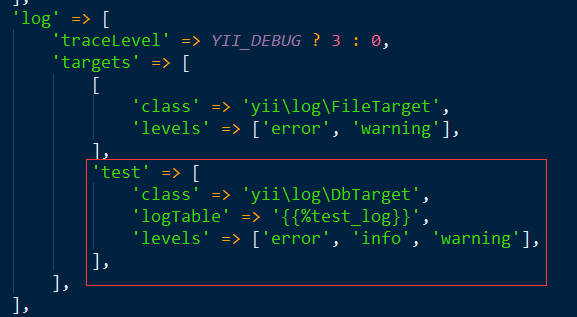
'log' => [
 'traceLevel' => YII_DEBUG ? 3 : 0,
 'targets' => [
  [
   'class' => 'yii\log\FileTarget',
   'levels' => ['error', 'warning'],
  ],
  'test' => [
   'class' => 'yii\log\DbTarget',//DaTarget类
   'logTable' => '{{%test_log}}',//日志表
   'levels' => ['error', 'info', 'warning'],//日志等级
  ],
 ],
],
二:生成日志表
在项目目录下执行如下命令生成日志表
php yii migrate --migrationPath=@yii/log/migrations/
三:使用日志
在需要使用日志的地方使用
四:自定义DbTarget日志
1:首先创建一个自定义的日志表
(1)在项目目录下执行
php yii migrate/create create_test_log
(2):在创建的migrate文件下编写创建数据库的迁移脚本
?php
use yii\db\Migration;
/**
 * Class m200720_091126_create_test_log
 */
class m200720_091126_create_test_log extends Migration
{
 /**
  * {@inheritdoc}
  */
 public function safeUp()
 {
  $this->createTable('{{%test_log}}', [
   'id' => $this->bigPrimaryKey(),
   'level' => $this->integer()->notNull()->comment('日志等级'),
   'category' => $this->string(100)->notNull()->comment('分类名称'),
   'prefix' => $this->text(),
   'route' => $this->string(100)->notNull()->comment('路由'),
   'method' => $this->string(20)->notNull()->comment('请求方式'),
   'app' => $this->string(20)->comment('请求应用'),
   'module' => $this->string(20)->comment('请求模块'),
   'request' => $this->text()->comment('请求参数'),
   'status' => $this->string(10)->notNull()->comment('状态码'),
   'message' => $this->text()->comment('日志内容'),
   'request_at' => $this->double()->notNull()->comment('请求时间'),
   'ip' => $this->string(63)->comment('请求IP'),
  ], 'CHARACTER SET utf8mb4 COLLATE utf8mb4_unicode_ci ENGINE=InnoDB COMMENT=\'请求日志表'');
  //增加索引
  $this->createIndex('idx_log_level', '{{%test_log}}', 'level');
  $this->createIndex('idx_log_category', '{{%test_log}}', 'category');
  $this->createIndex('idx_log_route', '{{%test_log}}', 'route');
  $this->createIndex('idx_log_method', '{{%test_log}}', 'method');
  $this->createIndex('idx_log_status', '{{%test_log}}', 'status');
 }
 /**
  * @inheritdoc
  */
 public function safeDown()
 {
  $this->dropTable('{{%test_log}}');
 }
}
(3):执行如下命令生成DbTarget日志表
2:编写一个DbTarget类来继承yiilogDbTarget类
?php
namespace app\components;
use Yii;
use yii\helpers\VarDumper;
use yii\log\LogRuntimeException;
use yii\web\HttpException;
use yii\web\Request;
/**
 * DbTarget stores log messages in a database table.
 *
 * @see yii\log\DbTarget
 *
 * @author wangjian
 * @since 1.0
 */
class DbTarget extends \yii\log\DbTarget
{
 /**
  * @inheritdoc
  */
 public $categories = [
  'application',
  'yii\web\HttpException:*',
 ];
 /**
  * @inheritdoc
  */
 public $except = [
  // 'yii\web\HttpException:404',
 ];
 /**
  * @inheritdoc
  */
 public $logVars = ['_GET', '_POST'];
 /**
  * @var string 用户组件ID
  */
 public $userComponentId = 'user';
 /**
  * @inheritdoc
  */
 public function collect($messages, $final)
 {
  $this->messages = array_merge($this->messages, static::filterMessages($messages, $this->getLevels(), $this->categories, $this->except));
  $count = count($this->messages);
  if ($count > 0  ($final || $this->exportInterval > 0  $count >= $this->exportInterval)) {
   $oldExportInterval = $this->exportInterval;
   $this->exportInterval = 0;
   $this->export();
   $this->exportInterval = $oldExportInterval;
   $this->messages = [];
  }
 }
 /**
  * @inheritdoc
  */
 public function getMessagePrefix($message)
 {
  if ($this->prefix !== null) {
   return call_user_func($this->prefix, $message);
  }
  if (Yii::$app === null) {
   return '';
  }
  $ip = $this->getIp();
  $ip = empty($ip) ? '-' : $ip;
  return "[$ip]";
 }
 /**
  * @inheritdoc
  */
 public function export()
 {
  if ($this->db->getTransaction()) {
   $this->db = clone $this->db;
  }
  $tableName = $this->db->quoteTableName($this->logTable);
  $sql = "INSERT INTO $tableName ([[level]], [[category]], [[prefix]], [[route]], [[method]], [[app]], [[module]], [[request]], [[status]], [[message]], [[request_at]], [[ip]])
    VALUES (:level, :category, :prefix, :route, :method, :app, :module, :request, :status, :message, :request_at, :ip)";
  $command = $this->db->createCommand($sql);
  $request = Yii::$app->getRequest();
  list($route, $params) = $request->resolve();
  $method = $request->getMethod();
  $module = Yii::$app->controller->module->id;
  $route = str_replace("{$module}/", '', $route);
  foreach ($this->messages as $message) {
   list($text, $level, $category, $timestamp) = $message;
   $statusCode = 200;
   if (!is_string($text)) {
    if ($text instanceof \Throwable || $text instanceof \Exception) {
     $statusCode = $text instanceof HttpException ? $text->statusCode : 500;
     $text = $text->getMessage();
    } else {
     $text = VarDumper::export($text);
    }
   }
   if ($command->bindValues([
     ':level' => $level,
     ':category' => $category,
     ':prefix' => $this->getMessagePrefix($message),
     ':route' => $route,
     ':method' => $method,
     ':app' => Yii::$app->id,
     ':module' => $module,
     ':request' => $this->getContextMessage(),
     ':status' => $statusCode,
     ':message' => $text,
     ':request_at' => $timestamp,
     ':ip' => $this->getIp(),
    ])->execute() > 0) {
    continue;
   }
   throw new LogRuntimeException('Unable to export log through database!');
  }
 }
 /**
  * 获取当前IP
  */
 protected function getIp()
 {
  $request = Yii::$app->getRequest();
  return $request instanceof Request ? $request->getUserIP() : '';
 }
}
3:在配置文件中将yiilogDbTarget类改成我们自定义的类
'log' => [
 'traceLevel' => YII_DEBUG ? 3 : 0,
 'targets' => [
  [
   'class' => 'yii\log\FileTarget',
   'levels' => ['error', 'warning'],
  ],
  'test' => [
   'class' => 'app\components\DbTarget',
   'logTable' => '{{%test_log}}',
   'levels' => ['error', 'info', 'warning'],
  ],
 ],
],
4:使用DbTarget日志
同样的使用Yii::info来记录日志
到此这篇关于Yii使用DbTarget实现日志功能的示例代码的文章就介绍到这了,更多相关Yii DbTarget 日志内容请搜索脚本之家以前的文章或继续浏览下面的相关文章希望大家以后多多支持脚本之家!
您可能感兴趣的文章:- YII2框架中日志的配置与使用方法实例分析
- Yii框架日志操作图文与实例详解
- Yii框架日志记录Logging操作示例
- Yii框架实现记录日志到自定义文件的方法
- Yii2框架中日志的使用方法分析
- 全面解读PHP的Yii框架中的日志功能
- YII Framework框架教程之日志用法详解
- PHP的Yii框架的常用日志操作总结
- 详解PHP的Yii框架中日志的相关配置及使用



 咨 询 客 服