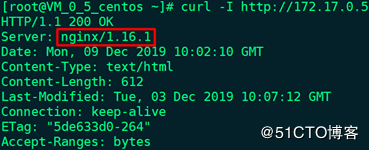
1、默认使用curl命令访问:
# curl -I http://172.17.0.5
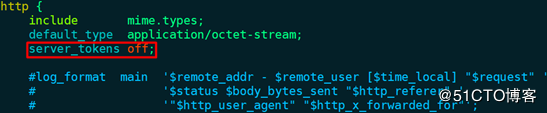
2、修改nginx.conf配置文件,在http配置段中新增如下代码:
# vim /usr/local/nginx/conf/nginx.conf
server_tokens off;
3、修改fastcgi.conf配置文件,注释如下代码:
# vim /usr/local/nginx/conf/fastcgi.conf
fastcgi_param SERVER_SOFTWARE nginx/$nginx_version;
4、重载Nginx:
# nginx -s reload
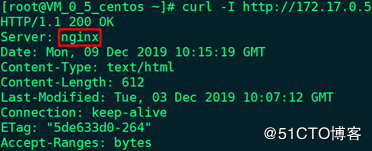
5、使用curl命令访问:
# curl -I http://172.17.0.5
6、伪造Nginx的名称和版本号:
# vim /usr/src/nginx-1.16.1/src/core/nginx.h,修改如下代码
#define NGINX_VERSION "1.16.1" --> #define NGINX_VERSION "2.3.2"
#define NGINX_VER "nginx/" NGINX_VERSION --> #define NGINX_VER "Tengine/" NGINX_VERSION
# cd /usr/src/nginx-1.16.1
# ./configure --prefix=/usr/local/nginx --user=nginx --group=nginx --with-threads --with-file-aio --with-http_ssl_module --with-http_v2_module --with-http_realip_module --with-http_addition_module --with-http_xslt_module --with-http_image_filter_module --with-http_geoip_module --with-http_sub_module --with-http_dav_module --with-http_flv_module --with-http_mp4_module --with-http_gunzip_module --with-http_gzip_static_module --with-http_auth_request_module --with-http_random_index_module --with-http_secure_link_module --with-http_degradation_module --with-http_slice_module --with-http_stub_status_module --with-http_perl_module --with-mail --with-mail_ssl_module --with-stream --with-stream_ssl_module --with-stream_realip_module --with-stream_geoip_module --with-stream_ssl_preread_module --with-compat --with-pcre
# make && make install
# cd /usr/local/nginx/conf
# vim nginx.conf,删除之前新增的代码:server_tonkens off;
# nginx -s stop
# nginx
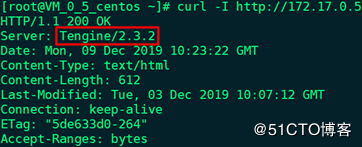
7、使用curl命令访问:
# curl -I http://172.17.0.5
总结
以上所述是小编给大家介绍的Nginx隐藏和伪造版本号的操作方法,希望对大家有所帮助,如果大家有任何疑问请给我留言,小编会及时回复大家的。在此也非常感谢大家对脚本之家网站的支持!
如果你觉得本文对你有帮助,欢迎转载,烦请注明出处,谢谢!



 咨 询 客 服