
网站每个栏目都有不同的banner大图,为了方便客户可以直接在后台栏目处添加和更换这个栏目图片,我们需要给dedecms二次开发,增加栏目图片上传选项。
织梦栏目添加banner大图上传选项
1.先给数据库中的dede_arctype表增加一个字段
后台 - 系统 - 系统设置 - SQL命令行工具
ALTER TABLE `dede_arctype` ADD `typebigpic` CHAR( 255 ) NOT NULL DEFAULT '';
2.打开 \dede\templets\catalog_add.htm 搜索
name="typename"
在它的</tr>下面加入
<script language='javascript' src="js/main.js"></script>
<tr id="pictable">
<td height="24" colspan="6">
<table border="0" cellspacing="0" cellpadding="0">
<tr>
<td width="158"> 图片地址:</td>
<td width="560">
<table width="100%" border="0" cellspacing="1" cellpadding="1">
<tr>
<td height="30">
<input name="typebigpic" type="text" id="picname" style="width:220px" value="" />
<input type="button" name="Submit2" value="站内选择" style="margin-left:8px;" onClick="SelectImage('form1.picname','');" class='np coolbg'/>
</td>
</tr>
</table>
</td>
<td width="270">
<style>
.divpre,.divpre img{height:50px;}
</style>
<img src="images/pview.gif" width="100" height="50" id="picview" name="picview">
</td>
</tr>
</table>
</td>
</tr>
|
3.打开 \dede\templets\catalog_edit.htm 搜索
name="typename"
在它的</tr>下面加入
<script language='javascript' src="js/main.js"></script>
<tr id="pictable">
<td height="24" colspan="6">
<table border="0" cellspacing="0" cellpadding="0">
<tr>
<td width="158"> 图片地址:</td>
<td width="560">
<table width="100%" border="0" cellspacing="1" cellpadding="1">
<tr>
<td height="30">
<input name="typebigpic" type="text" id="picname" style="width:220px" value="<?php echo $myrow['typebigpic']?>" />
<input type="button" name="Submit2" value="站内选择" style="margin-left:8px;" onClick="SelectImage('form1.picname','');" class='np coolbg'/>
</td>
</tr>
</table>
</td>
<td width="270">
<style>
.divpre,.divpre img{height:50px;}
</style>
<img src="<?php if($myrow['typebigpic']!="") echo $myrow['typebigpic']; else echo "images/pview.gif";?>" width="100" height="50" id="picview" name="picview">
</td>
</tr>
</table>
</td>
</tr>
|
4.打开 \dede\catalog_add.php 搜索
$in_query = "INSERT INTO `dede_arctype`(reid,topid,sortrank,typename
改成
$in_query = "INSERT INTO `dede_arctype`(reid,topid,sortrank,typename,typebigpic
继续搜索
VALUES('$reid','$topid','$sortrank','$typename'
改成
VALUES('$reid','$topid','$sortrank','$typename','$typebigpic'
5.打开 \dede\catalog_edit.php 搜索
`smalltypes`='$smalltypes'
改成
`smalltypes`='$smalltypes',`typebigpic`='$typebigpic'
6.打开 \include\taglib\channelartlist.lib.php 搜索
typedir
改成
typedir,typebigpic
7.打开 \include\taglib\channel.lib.php 搜索
typedir
改成
typedir,typebigpic
注意:这个文件有4处都需要改
8.打开 \include\taglib\type.lib.php 搜索
typedir
改成
typedir,typebigpic
9.\include\arc.listview.class.php 搜索
//设置环境变量
在它下面添加
$this->Fields['typebigpic'] = $this->TypeLink->TypeInfos['typebigpic'];
后台栏目效果
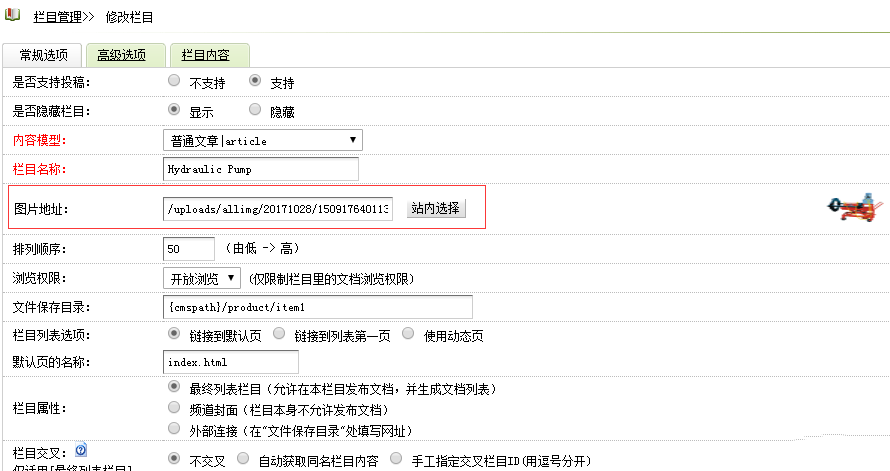
(此图片来源于网络,如有侵权,请联系删除! )
前台模板中调用标签
{dede:channelartlist}{dede:field.typebigpic/}{/dede:channelartlist}

{dede:channel}[field:typebigpic/]{/dede:channel}

{dede:type}[field:typebigpic/]{/dede:type}
|
栏目列表页单独调用
{dede:field.typebigpic/}