
强大号码库资源任选,方便,快捷,快速开通。
咨询热线:400-1100-266
大家应该都知道rel='nofllow'的作用,它是告诉搜索引擎,不要将该链接计入权重。
因此多数情况下,我们可以将一些不想传递权重的链接进行nofllow处理;
例如一些非本站的链接,不想传递权重,但是又需要加在页面中的,
像 外部链接、统计代码、备案号链接、供用户查询的链接等等。
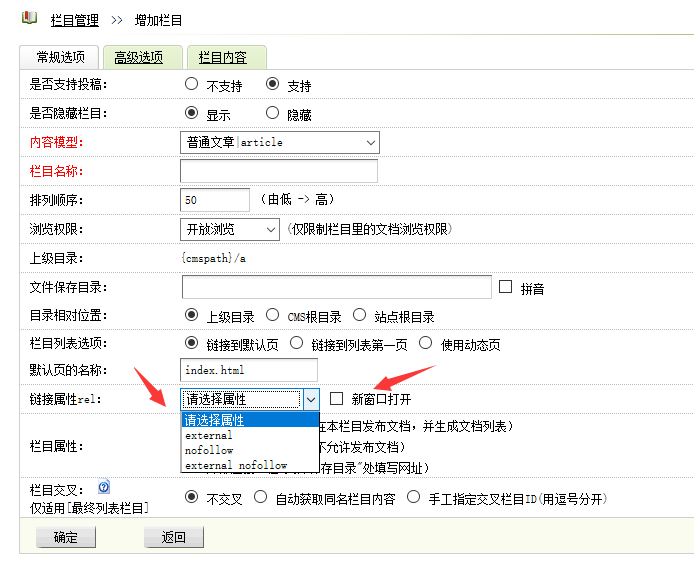
为了方便管理,直接在织梦后台栏目里自由把控每个栏目对应的链接属性,
我们来给织梦栏目增加链接属性rel="nofllow" rel="external" rel="external nofollow"和新窗口target="_blank"
- rel="nofllow" (告诉搜索引擎该链接不计入权重)
- rel="external" (告诉搜索引擎该链接不是本站链接)
- rel="external nofollow" (告诉搜索引擎该链接不是本站链接也不计入权重)
(此图片来源于网络,如有侵权,请联系删除! )
实现教程
1、后台-系统-SQL工具,执行
ALTER TABLE `arctype` ADD `nofollow` CHAR( 60 ) NOT NULL DEFAULT ''; ALTER TABLE `arctype` ADD `target` CHAR( 60 ) NOT NULL DEFAULT ''; |
2、打开 /dede/catalog_add.php 找到,大概在 239 行左右
UpDateCatCache(); |
在它的 上面 加入
$id = $dsql->GetLastID(); $upquery = "UPDATE `arctype` SET `nofollow`='$nofollow',`target`='$target' WHERE id='$id' "; $dsql->ExecuteNoneQuery($upquery); |
3、打开 /dede/catalog_edit.php 找到,大概在 106 行左右
UpDateCatCache(); |
在它的 上面 加入
$upquery = "UPDATE `arctype` SET `nofollow`='$nofollow',`target`='$target' WHERE id='$id' "; $dsql->ExecuteNoneQuery($upquery); |
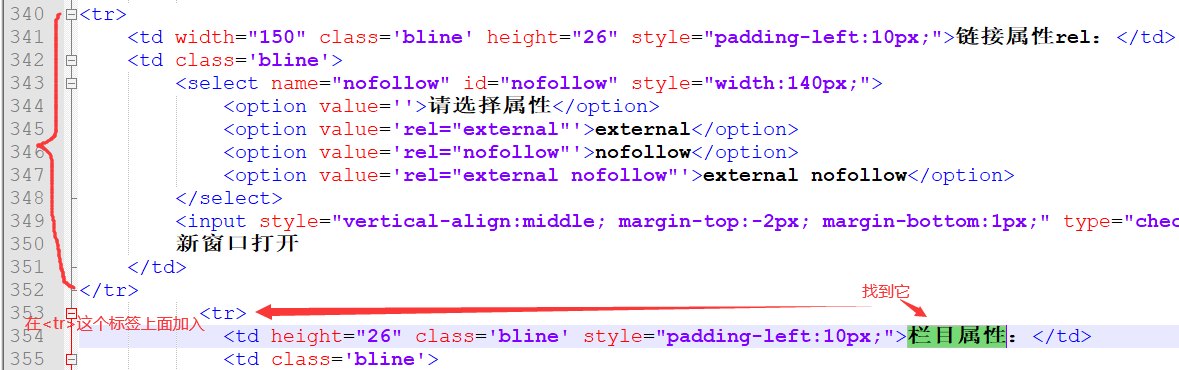
4、打开 /dede/templets/catalog_add.htm 找到
栏目属性
在它上面一行的<tr>上面加入
<tr> <td width="150" class='bline' height="26" style="padding-left:10px;">链接属性rel:</td> <td class='bline'> <select name="nofollow" id="nofollow" style="width:140px;"> <option value=''>请选择属性</option> <option value='rel="external"'>external</option> <option value='rel="nofollow"'>nofollow</option> <option value='rel="external nofollow"'>external nofollow</option> </select> <input style="vertical-align:middle; margin-top:-2px; margin-bottom:1px;" type="checkbox" name="target" value='target="_blank"' class="np"> 新窗口打开 </td> </tr> |
如图
(此图片来源于网络,如有侵权,请联系删除! )
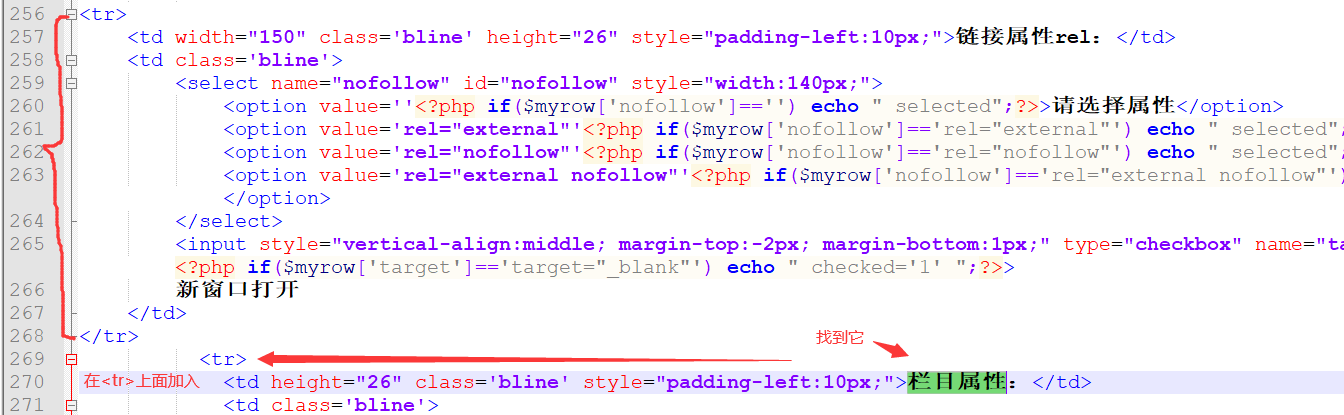
5、打开 /dede/templets/catalog_edit.htm 找到
栏目属性
在它上面一行的<tr>上面加入
<tr> <td width="150" class='bline' height="26" style="padding-left:10px;">链接属性rel:</td> <td class='bline'> <select name="nofollow" id="nofollow" style="width:140px;"> <option value=''<?php if($myrow['nofollow']=='') echo " selected";?>>请选择属性</option> <option value='rel="external"'<?php if($myrow['nofollow']=='rel="external"') echo " selected";?>>external</option> <option value='rel="nofollow"'<?php if($myrow['nofollow']=='rel="nofollow"') echo " selected";?>>nofollow</option> <option value='rel="external nofollow"'<?php if($myrow['nofollow']=='rel="external nofollow"') echo " selected";?>>external nofollow</option> </select> <input style="vertical-align:middle; margin-top:-2px; margin-bottom:1px;" type="checkbox" name="target" value='target="_blank"' class="np"<?php if($myrow['target']=='target="_blank"') echo " checked='1' ";?>> 新窗口打开 </td> </tr> |
如图
(此图片来源于网络,如有侵权,请联系删除! )
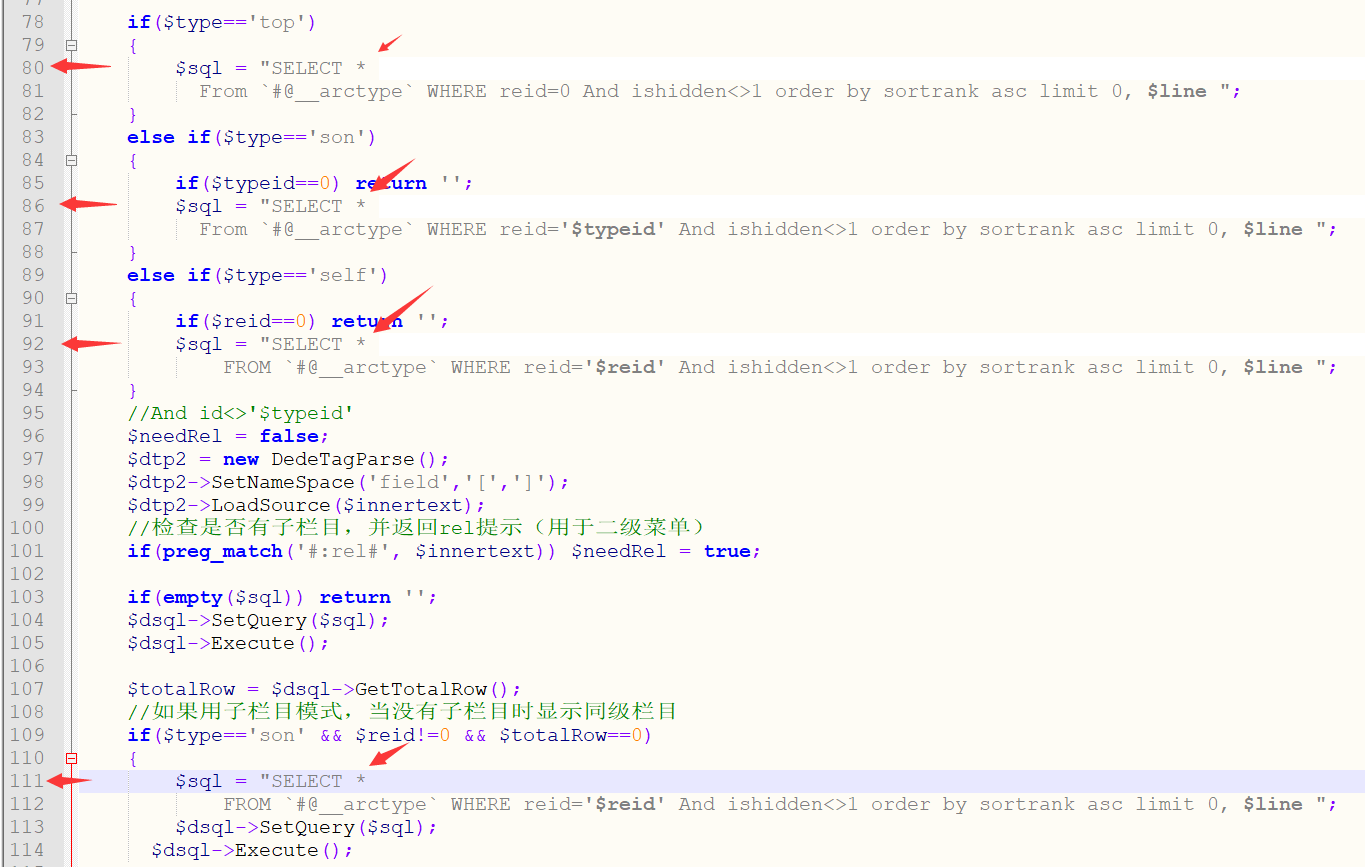
6、打开 /include/taglib/channel.lib.php 找到,80、86、92、111行的
id,typename,typedir,isdefault,ispart,defaultname,namerule2,moresite,siteurl,sitepath |
这4处都改
* |
如图
(此图片来源于网络,如有侵权,请联系删除! )
7、打开 /include/taglib/channelartlist.lib.php 找到,大概在 78 行
id,typename,typedir,isdefault,ispart,defaultname,namerule2,moresite,siteurl,sitepath |
改成
* |
如图

(此图片来源于网络,如有侵权,请联系删除! )
8、打开 /include/taglib/type.lib.php 找到,大概在 42 行
id,typename,typedir,isdefault,ispart,defaultname,namerule2,moresite,siteurl,sitepath |
改成
* |
如图

(此图片来源于网络,如有侵权,请联系删除! )
栏目调用标签里的标签写法
dede:channelartlist标签写法
<ul>
{dede:channelartlist row=7 typeid=top}
<li><a href="{dede:field.typeurl/}" {dede:field.nofollow/} {dede:field.target/}>{dede:field.typename/}</a></li>
{/dede:channelartlist}
</ul>
|
dede:channel标签写法
{dede:channel type=top row=7}
<li><a href="[field:typelink/]" [field:nofollow/] [field:target/]>[field:typename/]</a></li>
{/dede:channel}
|
dede:type标签写法
{dede:type typeid=1}
<li><a href="[field:typeurl/]" [field:nofollow/] [field:target/]>[field:typename/]</a></li>
{/dede:type}
|
注意:标红的那2个标签前面记得要加个空格

时间:9:00-21:00 (节假日不休)
版权所有:巨人网络(扬州)科技有限公司
总部地址:江苏省信息产业基地11号楼四层
《增值电信业务经营许可证》 苏B2-20120278